- Published on
Leveraging Swift's Type-Safety in the New Metrics Feature
- Authors

- Name
- Phil Niedertscheider
With the release of our Apple / Cocoa SDK v9.2.0 a long requested feature is now finally here: Metrics.
Already available in some of our other SDKs including the Python SDK, the JavaScript SDK and the Go SDK, you can now use Sentry to collect useful metrics to gain even more insights into your app experience:
// Counter metrics allow you to measure how many times an event has occurred
SentrySDK.metrics.count(
    key: "network.request.count",
    value: 1,
    unit: .generic("request"),
    attributes: [
        "endpoint": "/api/users",
        "method": "POST",
        "body_size": 1786
    ]
)

// Gauge metrics are used for constantly changing values
SentrySDK.metrics.gauge(
    key: "queue.depth",
    value: 42.0,
    attributes: [
        "queue_name": "api_requests"
    ]
)

// Distribution metrics track the statistical distribution of values
SentrySDK.metrics.distribution(
    key: "http.response_time",
    value: 187.5,
    unit: .millisecond
)
While the implementation of the first proof-of-concept was already done weeks ago, a lot of thought has been put into the design of the public API - the main point of interaction for our SDK users which must not be changed unless absolutely necessary. Leveraging Swift's strong typing system, we created an approach to surface potential issues at compile-time rather than when your app has been published.
So join me on this deep-dive on why the Metrics feature is Swift-only (for now), and which engineering decisions we took along the way, to give you, our SDK users, the most sophisticated user experience possible.
Three Important Methods
Let's start at the beginning.
From a user perspective, the most important parts are the methods used to capture metrics. To enable this, the SDK needs to offer a SentrySDK.metrics object with the three methods .count(..), .gauge(..) and .distribution(..), each with a key and value parameter.
This brings up the first opportunity where we decided against surfacing a concrete type, and instead adopt it using a protocol (also known as "interfaces" in other programming languages), allowing us to easily refactor otherwise public types in the future, reducing the need for breaking changes in the future.
This brings up the first benefit of using Swift. We use Double for the gauge and distribution metrics to capture values with floating point precision, including negative values. But for counter metrics we realized that the count is always a whole number and never negative, resulting in the first decision of using unsigned integers UInt for counter metrics.
public protocol SentryMetricsApiProtocol {
    func count(key: String, value: UInt)
    func distribution(key: String, value: Double)
    func gauge(key: String, value: Double)
}
Omit Parameter With Default Values
Looking at our technical specifications for Metrics we notice one detail in the requirements:
For
countermetrics: the count to increment by (should default to 1)
This means it must be possible for SDK users to capture a counter metric without having to explicitly define a value, falling back to 1 as a default. Commonly this is solved by using a default value in the method signature, i.e. func count(key: String, value: UInt = 1) allowing an invocation with count(key: "my-key") and count(key: "my-key", value: 123).
Unfortunately Swift's protocols do not support default values in their definitions, leaving us with a build-time error:

Luckily there is a solution: Protocol Extensions.
Extensions in Swift allow adding additional logic to types, e.g. if a type has a getter for firstName and lastName an extension could add fullName returning the concatenation of the two strings.
struct Person {
    let firstName: String
    let lastName: String
}

extension Person {
    var fullName: String {
        firstName + " " + lastName
    }
}
The important part to understand here is that protocol extensions only know about the signature of the protocol, therefore we can also only access methods defined in SentryMetricsApiProtocol. But this is actually all we need, as we are adding convenience overloads for our methods, allowing callers to omit the optional parameters:
public extension SentryMetricsApiProtocol {
    func count(key: String, value: UInt = 1) {
        // Call the implementation of the protocol which requires the value
        self.count(key: key, value: value)
    }
}
Great, now that we have our public API established with a default value for counters, it's time to extend it with the next useful addition: metrics units.
Metrics Units
Sentry's telemetry system has a standardized list of pre-defined units enabling server-side aggregation and data processing.
The simplest solution would be changing the API to offer a String parameter to define the unit. But, as these are standardized, we can also use Swift's enum type to offer compile-time safety and by defining the raw value to String, the compiler takes care of generating String values for each case and other boilerplate code for us:
public enum SentryUnit: String {
    case nanosecond
    case microsecond
    case millisecond

    // ... and more!
}

// Example:
let unit = SentryUnit.nanosecond

// When the compiler can infer the type of a variable, we don't need to explicitly define it again on the right-hand side:
let unit: SentryUnit = .nanosecond
As the unit parameter is optional and should also be omittable, we can leverage our protocol extension to implement it:
public protocol SentryMetricsApiProtocol {
    func count(key: String, value: UInt, unit: SentryUnit?)
    func distribution(key: String, value: Double, unit: SentryUnit?)
    func gauge(key: String, value: Double, unit: SentryUnit?)
}

public extension SentryMetricsApiProtocol {
    func count(key: String, value: UInt = 1, unit: SentryUnit? = nil) {
        self.count(key: key, value: value, unit: unit)
    }

    func distribution(key: String, value: Double, unit: SentryUnit? = nil) {
        self.distribution(key: key, value: value, unit: unit)
    }

    func gauge(key: String, value: Double, unit: SentryUnit? = nil) {
        self.gauge(key: key, value: value, unit: unit)
    }
}

// Example Usage:

// Value falls back to 1, unit is nil
SentrySDK.metrics.count(key: "network.request.count")
// Value is explicitly set to 2, unit is still nil
SentrySDK.metrics.count(key: "memory.warning", value: 2)
// Both the value and unit are set
SentrySDK.metrics.count(key: "queue.processed_bytes", value: 512, unit: .bytes)
So, how about using non-standard units?
Enums And Generic Values
While using an enum as a type-safe approach of constants, we lost a big advantage compared to pure String constants, as we are now not able to use generic units anymore. The method typing is strict and if we pass in a parameter unit, it must be a SentryUnit.
This is where Swift's Associated Values come into play, allowing us to keep using well-known enum types, but extending our new type generic with an associated custom String value:
public enum SentryUnit {
    case nanosecond
    case generic(String)
}

let unit = SentryUnit.generic("custom unit")
Unfortunately, this change requires us to remove the raw value conformance to the type String, resulting in the loss of compiler generated serialization:

But, this minor inconvenience can easily be resolved by implementing conformance to the Swift standard library's RawRepresentable protocol, with all unknown unit types converting from or to the enum type generic:
extension SentryUnit: RawRepresentable {
    /// Maps known unit strings to their corresponding enum cases, or falls back to `.generic(rawValue)` for any unrecognized string (custom units).
    public init?(rawValue: String) {
        switch rawValue {
        case "nanosecond":
            self = .nanosecond
        default:
            self = .generic(rawValue)
        }
    }

    /// Returns the string representation of the unit.
    public var rawValue: String {
        switch self {
        case .nanosecond:
            return "nanosecond"
        case .generic(let value):
            return value
        }
    }
}
Now it's easy to add more information to our metrics, e.g. by using a custom unit type "warning":
SentrySDK.metrics.counter(
    key: "memory.warning",
    value: 2,
    unit: .generic("warning")
)
Syntactic Sugar for Custom Units
Looking at the usage of the generic unit as in unit: .generic("custom") raises the idea of how we can reduce boilerplate code. We already know that if we don't use any of the pre-defined constants like .nanosecond, we always have a String value that should always be seen as a "generic" / "custom" unit (Yes, always is bold twice on purpose).
If wrapping it in SentryUnit.generic(..) (or just .generic(..)) every single time seems like repetitive boilerplate code to you, there's something we can do about it!
As a final cherry-on-top improvement opportunity for generic units, we adopt the protocol ExpressibleByStringLiteral for our enum SentryUnit. This protocol of the Swift standard library is baked into the compiler and requires us to define an additional initializer:
extension SentryUnit: ExpressibleByStringLiteral {
    public init(stringLiteral value: StringLiteralType) {
        self = .generic(value)
    }
}
But now this small extension indicates to the compiler that literal String values can directly be converted into enums:
// ✅ Compiler converts the string to an enum with associated value
let unit: SentryUnit = "warning"

// ❌ Does not work for String variables, only literal values
let myUnit = "some value"
let unit: SentryUnit = myUnit

// ✅ String variables still need to be wrapped
let unit: SentryUnit = .generic(myUnit)
All of these additions now result in an even cleaner API with custom metric units, while still supporting pre-defined constants.
SentrySDK.metrics.count(
    key: "memory.warning",
    value: 2,
    unit: "warning"
)
Adding Context With Attributes
Now it's time to add our last parameter to the public methods: Attributes.
Attributes are a list of key-value pairs with a String as a key and a value of different types. At the time of writing this blog these are the value types supported by Sentry's data processing:
stringbooleaninteger(64-bit signed integer)double(64-bit floating point number)string[]boolean[]integer[]double[]
Attributes are not a new addition to the SDK due to Metrics, as they're already used by the Logs feature released with v8.54.0 in July 2025.
During the initial implementation of logging, we decided to adopt a generic type Any for the value of the attributes, allowing us to include all of the supported types, while also being compatible with Objective-C.
@objc(info:attributes:)
public func info(_ body: String, attributes: [String: Any]) {
    // Convert provided attributes to SentryLog.Attribute format
    var logAttributes = attributes.mapValues { SentryLog.Attribute(value: $0) }

    // Create and capture a full log entry
    let log = SentryLog(
        timestamp: dateProvider.date(),
        traceId: SentryId.empty,
        level: level,
        body: SentryLogMessage(stringLiteral: body),
        attributes: logAttributes
    )
    delegate.capture(log: log)
}
The type SentryLog.Attribute is actually a typealias for the SentryAttribute which is a class type holding a String identifier type and a type-erased property value.
This works as expected, but requires a lot of manual type-erasing and type-casting, so when it came to designing the new Swift-only Metrics API, we started again from scratch.
During the first review discussions we considered the idea of using an array of SentryAttribute as the parameter, which got scratched immediately because we would lose compile-time checking for duplicate key literal values we get when using the dictionary:
// Definition:
func count(key: String, value: UInt, attributes: [SentryAttribute])

// Usage with array of attributes
SentrySDK.metrics.count(
    key: "network.request.count",
    value: 1,
    attributes: [
        SentryAttribute(key: "endpoint", value: "/api/users"),
        SentryAttribute(key: "endpoint", value: "/api/users/123"), // ❌ Key used twice
    ]
)

// Usage with dictionary of attribute values
SentrySDK.metrics.count(
    key: "network.request.count",
    value: 1,
    attributes: [
        "endpoint": "/api/users",
        "endpoint": "/api/users/123", // ✅ won't compile
    ]
)
This was enough reason to conclude, that we still want to have a dictionary of String keys with associated values.
But do we really want to have type-erased value types? Can't we use Swift to define a list of types possible for the value of the attributes?
Understanding The Problem Of Any
As a first step to find a solution, we need to understand our problem.
One major drawback of using Any as the value of our attributes is missing compile-time hints if the passed-in value is actually one of our supported attribute value types.
To visualize this, take a look at the following example from the Logs API, where we set a String, a Int, a Double and a custom class type instance as attributes:
class MyType {
    let foo = "bar"
}
let instance = MyType()

SentrySDK.logger.info("Hello World", attributes: [
    "some-string": "baz",
    "some-int": 123,
    "some-double": 456.789,
    "some-instance": instance
])
This is valid code which will compile, because using type-erased Any for the value will allow passing in anything. As a fallback for unknown types such as MyType, we are performing an internal conversion to String, resulting in the following serialized data:
{
  "severity_number": 9,
  "body": "Hello World",
  "attributes": {
    "some-string": {
      "value": "baz",
      "type": "string"
    },
    "some-double": {
      "value": 456.789,
      "type": "double"
    },
    "some-int": {
      "value": 123,
      "type": "integer"
    },
    "some-instance": {
      "value": "MyApp.MyApp.(unknown context at $103d12130).(unknown context at $103d1213c).MyType",
      "type": "string"
    }
  }
}
I believe it's obvious for all readers that MyApp.MyApp.(unknown context at $103d12130).(unknown context at $103d1213c).MyType is pretty much a useless attribute value. Even worse, the $103d12130 and $103d1213c are actually memory addresses, so they will be different with every attribute sent, making it non-deterministic and unusable for querying.
One variant to improve this is adopting the protocol CustomStringConvertible, requiring us to implement the description getter method (often known as toString() in other programming languages):
class MyType: CustomStringConvertible {
    let foo = "bar"
    let baz = "foobar"

    var description: String {
        return "<MyType: foo=\(foo), baz=\(foobar)>"
    }
}
This example then serializes to the following payload:
{
  "some-instance": {
    "value": "<MyType: foo=bar, baz=foobar>",
    "type": "string"
  }
}
This looks already way better, as the memory addresses are now gone, and we can actually see the values themselves. But this already raised the next concerns:
- Does every type now need to adopt
CustomStringConvertiblejust in case I accidentally use it as a value?
Yes, in case you keep using class types as attribute values, they need to adopt the protocol otherwise we get the memory addresses back. And yes, this is inconvenient.
- Do we really want multiple values in a single attribute?
No, you most likely do not want this, as you want attribute values to be simple and deterministic in meaning, so you can easily write queries in Sentry and explore your data. Having them in the same attribute brings in complexity for querying, both for you and for us at Sentry, so generally speaking, it's easier to split them up.
- So if I shouldn't do this, why can't the compiler tell me that I am using a type which will require a fallback, and maybe even produce garbage value data?
That's the exact question we asked ourselves too, resulting in us adopting more Swift language features as you can see in the next sections of this blog post.
One Type To Rule Them All
As a first step we use the same approaches as described earlier for SentryUnit by introducing an enum with associated values: SentryAttributeContent.
(P.S. there were many rounds of renamings happening in the pull requests, from "value" to "content" etc., simply because naming is hard).
enum SentryAttributeContent {
    case string(String)
    case boolean(Bool)
    case integer(Int)
    case double(Double)
    case stringArray([String])
    case booleanArray([Bool])
    case integerArray([Int])
    case doubleArray([Double])
}

public protocol SentryMetricsApiProtocol {
    func count(key: String, value: UInt, attributes: [String: SentryAttributeContent])
}

SentrySDK.metrics.count(key: "network.request.count", value: 5, attributes: [
    "endpoint": .string("/api/users"),
    "method": .string("POST"),
    "body_size": .integer(1786)
])
This is already way better than using Any, because now we can only pass in attribute values which are defined as associated values of our enum.
So, are we ready to ship? 🚀 Not quite yet, because just a bit more engineering and we realize that while our protocol allows double values, it does not allow float values, leaving us with an ugly conversion like this:
let latency: Float = 123.456
SentrySDK.metrics.distribution(key: "network.latency", value: 123, attributes: [
    "body_size": .double(Double(latency))
])
On top of that we now have once again like in the SentryUnit growing boilerplate code, requiring us to convert our variables and literals to enum values every single time.
So what's the Swift-way to handle this? Exactly! One type protocol to rule them all.
protocol SentryAttributeValue {
    var asSentryAttributeContent: SentryAttributeContent { get }
}

public protocol SentryMetricsApiProtocol {
    func count(key: String, value: UInt, attributes: [String: any SentryAttributeValue])
}
With this new protocol, we change the method signature of our public API once again and now it's not even using a concrete type for the attribute value, it just accepts any type which adopted the protocol SentryAttributeValue, therefore declaring that it has a getter method or property to represent itself as a SentryAttributeContent enum value.
Now every type can define itself as being representable as one of our supported types, especially types available in the Swift standard library, but also our custom types such as MyType from the examples above:
extension String: SentryAttributeValue {
    public var asSentryAttributeContent: SentryAttributeContent {
        return .string(self)
    }
}

extension Bool: SentryAttributeValue {
    public var asSentryAttributeContent: SentryAttributeContent {
        return .boolean(self)
    }
}

extension Int: SentryAttributeValue {
    public var asSentryAttributeContent: SentryAttributeContent {
        return .integer(self)
    }
}

extension Double: SentryAttributeValue {
    public var asSentryAttributeContent: SentryAttributeContent {
        return .double(self)
    }
}

extension Float: SentryAttributeValue {
    public var asSentryAttributeContent: SentryAttributeContent {
        return .double(Double(self)) // ✅ Float-to-Double conversion is hidden away
    }
}

class MyType: SentryAttributeValue {
    let foo = "bar"

    var asSentryAttributeContent: SentryAttributeContent {
        return .string(foo) // Custom types can use any of our supported content types
    }
}
These extensions are part of the SDK, therefore everyone can now use the metrics API as defined at the beginning of this post, supporting variables and literals:
let method = "POST" // Variables can be represented
SentrySDK.metrics.count(
    key: "network.request.count",
    value: 1,
    unit: .generic("request"),
    attributes: [
        "endpoint": "/api/users", // Literals can be represented
        "method": method,
        "body_size": 1786
    ]
)
Encountering Compiler Limitations
You might have noticed that I did not mention the support of Array much yet. That's due to array handling being quite complex, so I want to dedicate this section to it.
As we have established already, we need to extend Array so it also adopts and implements the method of SentryAttributeValue, but for the best user experience, we want to extend it only if the array contains elements which are one of our supported types.
The initial approach was using the extension <TYPE> where <CONDITION> approach offered by Swift, to add logic to a TYPE only if a CONDITION on the typing is fulfilled.
extension Array: SentryAttributeValue where Element == Int {
    public var asSentryAttributeContent: SentryAttributeContent {
        .integerArray(self)
    }
}
While this worked if we write the extension only for a single type, we started to hit compiler errors with multiple type extensions:
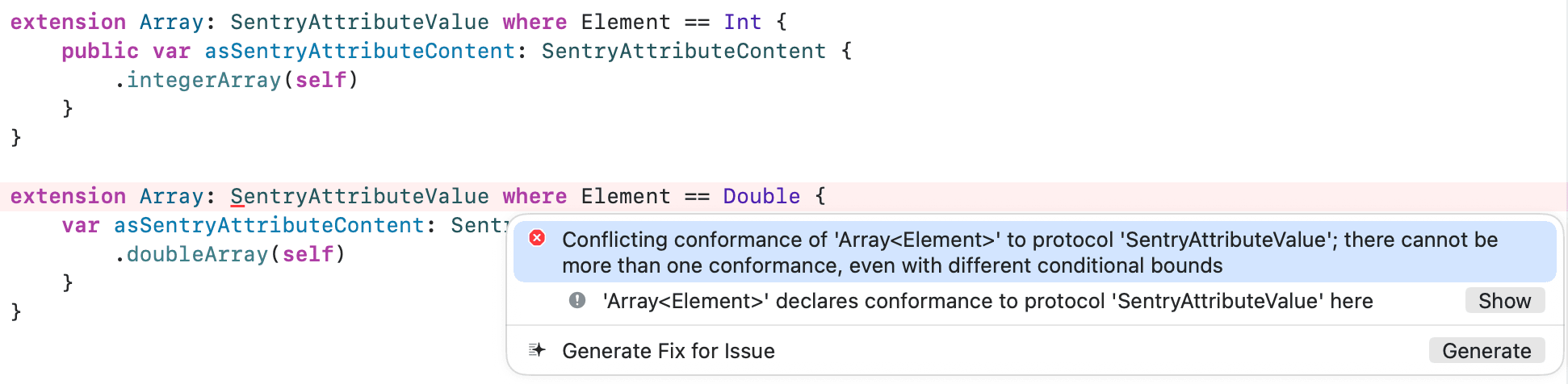
Bummer! We can't have multiple conformances of the same protocol scoped to specific element types. Luckily we already introduced SentryAttributeValue as our "union" of supported types.
extension Array: SentryAttributeValue where Element == SentryAttributeValue {
    public var asSentryAttributeContent: SentryAttributeContent {
        if Element.self == Bool.self, let values = self as? [Bool] {
            return .booleanArray(values)
        }
        // ... and other cases

        // Fallback to converting to strings
        return .stringArray(self.map { element in
            String(describing: element)
        })
    }
}
For the sake of readability of this blog post I am not going to embed the entire casting logic here, so if you want to see it in detail, all of our source code is open source, so feel free to check it out.
This worked well (for a while), as we were now able to pass in String arrays, Bool arrays, etc. for all the types which adopted SentryAttributeValue:
SentrySDK.metrics.count(
    key: "network.request.count",
    attributes: [
        "endpoint": "/api/users",     // String can be represented as SentryAttributeValue
        "users": ["user-1", "user-2"], // Array of String can also be represented
        "values": [1, 2, 3]           // Array of Integer can also be represented
    ]
)
But there was already another pattern becoming visible: all of the arrays are homogeneous to a single type, therefore they were not actually arrays of SentryAttributeValue, but arrays of types adopting SentryAttributeValue.
It's a thin line in definition, which surfaced a challenge when mixing multiple types adopting SentryAttributeValue into a single array. We hoped that the compiler would somehow be smart enough to understand that now it's an array of SentryAttributeValue, but instead it fell back to an array of Any.
struct Foo: SentryAttributeValue {
    var asSentryAttributeContent: SentryAttributeContent {
        return .integer(1)
    }
}

struct Bar: SentryAttributeValue {
    var asSentryAttributeContent: SentryAttributeContent {
        return .integer(2)
    }
}

SentrySDK.metrics.count(
    key: "network.request.count",
    attributes: [
        // Mixed array of types adopting SentryAttributeValue
        // Both return integer content values, so this could be an integer[]
        "values": [Foo(), Bar()] // ❌ Not an [SentryAttributeValue] but [Any]
    ]
)
As Any is a type which can not be extended nor does it have a clear representation as an attribute value, we have to remove the condition from the Array extension and have additional handling:
extension Array: SentryAttributeValue {
    public var asSentryAttributeContent: SentryAttributeContent {
        if Element.self == Bool.self, let values = self as? [Bool] {
            return .booleanArray(values)
        }
        // ... and other cases
        if let values = self as? [SentryAttributeValue] {
            return castArrayToAttributeContent(values: values)
        }
        // Fallback to converting to strings
        return .stringArray(self.map { element in
            String(describing: element)
        })
    }
}
This was the final solution which now has to cast from arrays of Any to our known types, including handling of other types adopting the protocol and a String fallback for everything else.
Granular Control and Forwards-Compatibility
As it is common in our Sentry SDKs, we want to allow our users to be able to manually filter and manipulate collected metric items before they are sent to Sentry, either for data enrichment, data scrubbing and other use cases.
This was also decided for the Metrics feature, so we introduced the option beforeSendMetric which is a "[..] function that takes a metric object and returns a metric object [..] called before sending the metric to Sentry".
To embrace the Swift-iness of our implementation we also reconsidered the need of using class-based reference type instances for the metrics objects. Instead, they should be handled as immutable data inside of the SDK and only be transformed/mapped if needed. Therefore we decided to use struct data types instead with SentryMetric as our input type and SentryMetric? as a nullable return type.
While this removes compatibility with Objective-C (as struct is Swift-only), by using struct the metric is passed as an immutable copy to the beforeSendMetric closure and can not be modified directly, unless it's copied to a local variable first. We considered passing it in as an inout parameter to allow modification via a reference, but decided against it because it would require us to change the input parameter to be nullable too, which is never the case.
For the type of the attributes property of the metric, we decided to expose the dictionary not as SentryAttributeValue as in the capturing methods, but instead directly the enum SentryAttributeContent. This allows you to identify and modify the typed metrics using switch for multi-case or if case for single-cases handling.
Bringing it all together the beforeSendMetric can be used like this:
// Experimental for now, will be a top-level option in the future
class SentryExperimentalOptions {
    var beforeSendMetric: ((Sentry.SentryMetric) -> Sentry.SentryMetric?)?
}

options.experimental.beforeSendMetric = { metric in
    // Create a mutable copy (SentryMetric is a struct)
    var metric = metric

    // Drop metrics with specific attribute values set
    if case .boolean(let dropMe) = metric.attributes["dropMe"], dropMe {
        return nil
    }

    // Modify metric attributes using literals converted to our enum types
    metric.attributes["processed"] = true
    metric.attributes["processed_at"] = "2024-01-01"

    return metric
}
During one of our discussions we encountered an interesting edge case with regards to forward compatibility.
When using an enum in a switch case matching, it is necessary to handle either all cases, or to define a default case to match the unhandled ones:
enum Value {
    case boolean(Bool)
    case integer(Int)
    case string(String)
}

// Default case for unhandled ones
switch value {
case .boolean(let val):
    // val is true/false
default:
    // do nothing
}

// Handle all cases
let value: Value = ...
switch value {
case .boolean(let val):
    // val is true/false
case .integer(let val):
    // val is an integer
case .string(let val):
    // val is a String
}
The important aspect here is that the enum is defined in our SDK, therefore it can always happen that we want to implement a new type, e.g. float[], in a future release. Now if an SDK user handles all cases of the attribute value, therefore not having to add a default statement, this precondition could break the logic flow.
But the Swift compiler developers considered this edge case by offering the @unknown default case which can be added for Swift 5, and must be added for Swift 6:

// Handle all cases and unknown defaults
let value: Value = ...
switch value {
case .boolean(let val):
    // val is true/false
case .integer(let val):
    // val is an integer
case .string(let val):
    // val is a String
@unknown default:
    // handles all future cases
}
One alternative is attributing our enum as @frozen, indicating that the enum will never change in future versions. This is not something we want right now, because it makes sense for enums like e.g. CoordinateAxis having only vertical and horizontal axis and never anything else, but not for our evolving protocol definitions.
Conclusion
To conclude, defining an API is easy, but defining a stable API with a long-term vision takes more effort, which can pay off.
With the support of Swift protocols and enums our SDK users now get compile-time hints for unsupported types, while still supporting literal values and variables. We support homogeneous and heterogeneous arrays, including a fallback for unknown types handling compiler limitations. All this should make collecting information with the new Metrics features straightforward and easy to understand, while staying extensible and forwards compatible.
Unfortunately, it did not come without any downsides. The most notable one is missing support for Objective-C, as these public APIs now require Swift protocols with generics and types which can not be bridged out-of-the-box. But, if you are using Sentry with an Objective-C project, you can create your own type-erasing wrapper around our SDK for now, while we are already working on a Objective-C SDK.
Another downside was the limited support for compile-time hints of values in Arrays. This one is on the Swift compiler, therefore there's nothing else we can do for now, except handling unknown types gracefully with our internal fallback-to-String mechanism.
And as final disadvantage, we can not migrate the Logs API to also use these language features right now, as that would be a breaking change requiring a major release (which we just recently did).
All-together this pushes our SDK even more towards becoming a best-practice Swift SDK.
I hope you enjoyed following along our programming design process. If you are interested in joining us to bring even more value to our users, consider checking out our open positions.
Thanks for reading and if you have any questions, feel free to reach out to me on X or BlueSky.